Thursday, February 28, 2013

SAMSUNG HT-C5200 - HOW TO UPDATE FIRMWARE - REGION CODE SETTING - INITIALIZATION - PARENTAL LOCK PASSWORD RELEASE _ 2.1CH Blu-ray Home Theater System


Speaker -- PS-C5200
Front - PS-FC5200
Subwoofer - PS-WC5200

INITIALIZATION AND UPGRADE METHODS
 Method 1
Step 1: Open the tray.
Step 2: Press and hold “INFO” button on the remote for 5 seconds.
Method 2
Press “MENU” on the remote control
Setup → System Setup → System Information.
EXPLANATION OF F/W TERMS
  • S/W : BACKEND Firmware
  • Front : System micom
  • Loader : Loader Firmware
  • DSP : DSP firmware CEC : CEC firmware
  • Region : BD region code / DVD region code
  • Macrovision : Macrovision version
  • Model : Model name
  • ESN : Netflix serial number
  • BD/DVD Adjust : Loader Disc Adjust (only factory possible)
HOW TO UPDATE FIRMWARE
This menu allows you to upgrade software in order to improve the performance of the unit or to acquire additional services. In addition, you can also check the current software version, update via Internet, and set the Auto upgrade notification by using this menu. If the product is properly connected to the network via cable or wireless, then it will automatically connect to our website each time it is turned on and will download files in order to update itself.
  1. To select By Internet, press the “ENTER” button. You will be noticed with a popup message if it finds a software program to update.
  2. If you select Yes, it will turn off automatically before restarting. (Never turn it on manually.)
  3. The update progress popup will appear.  When the update is completed, it will turn back off automatically.
  4. Press the “POWER” button to turn on the product.
[Note]
Update will be completed when the product turns off after two times of restarting. Press the POWER button to turn on the updated product for your use.  Never turn off or on the product manually during the update process.
Samsung Electronics shall take no legal responsibility for product malfunction caused by an unstable Internet connection or consumer negligence during software upgrade

Can update software in any of the two ways as follows : Software update is the same as in the By Internet menu.
  • USB : Visit , then download and store the latest software (RUF file) into the USB flash drive. Connect the USB flash drive to the USB port of the product (disc tray must be empty) to update the software, then follow the on-screen instructions.
  • CD/DVD : Visit , download and write the latest software (RUF file) onto a disc.  Insert and play the disc in the product to start the update, then follow the on-screen instructions.
[Note]
  • If you want to cancel the upgrade in the process of downloading the upgrade data, press the ENTER button.
  • When the system upgrade is done, check the software details in the software Upgrade menu.
  • Do not turn off the product during the System Upgrade, as it may cause the product to not work properly.
  • Do not use USB devices other than USB Flash Drives to do software upgrades using the USB Host jack.
COLD START METHOD [INITIALIZE SETUP]
This is useful when one forgets their Parental Lock password.
  1. Press ‘STOP’ button on the front panel for over 5 seconds during the ‘no disc’ status.
  2. Then, VFD sign : ‘Initialize’ → Power will be turned off automatically.
  3. System Micom Cold Start
  4. During Stand-By, just press the Stop Button on the Remote Control for 5 seconds.  Then, the Red LED should blink.
BUYER - REGION CODE SETTING
After replacing the Main PBA and System Micom (IC1302), the region code should be inserted.
The unit will not work properly if you do not insert the correct region code.
Must use the remote control.
  1. Press the “TUNER MEMORY” button on the remote control for 4-5 seconds.
  2. After step (1), you should see the “T-MODE” message display on the VFD. Press the “down” direction button during this message.
** The “T-MODE” indicator on the VFD only appears for a very short time.
3.  After step (2), you can see “TEST − − −” on the VFD.  Insert the number “46” to select the Region Code.
4.  After step (3), you can see “− − −” on the VFD. Insert the Region Code  corresponding to the model and area in which you reside in using the “0-9” buttons on the remote control.

HT-C5200 Series 2.1CH Region Codes

USA  040
Japan  041
Korea  042
Taiwan  043
Philippines  044
Mexico  045
Latin American  046
Europe  047
Indonesia  048
Australia  049
Russia (semi_mic)  050  - Only models which support semi-karaoke not including MIDI file.
Russia (full_mic)  051 - Full karaoke models which support MIDI file.
Africa  052
China (semi_mic)  053
Brazil  054
Canada  055
ETC  056
ETC  057
ETC  058
ETC  059

Wednesday, February 27, 2013

LG 32LC41 - 32LC42 - 32LC43 - 32LC44 - CHANNEL MEMORY DOWNLOAD & EDID / DDC DOWNLOAD - WHITE BALANCE ADJUSTMENT


CHANNEL MEMORY DOWNLOAD
  • Connect the download jig to D-sub jack.
  • Execute ‘Channel.vi2c’ program in PC, then a main window will be opened.
  • Push the button change and select the Channel memory data.
  • Check the communication is OK or not.
  • Push the Read area (Ackn. Check) and check Cyan area is OK message.
  • Push the Update NVM from File.

EDID (The Extended Display Identification Data ) /DDC (Display Data Channel) download
Caution
Use the proper signal cable for EDID Download.
Never connect HDMI & D-SUB Cable at the same time.
Use the proper cables below for EDID Writing.

Sequence of Adjustment
  • DDC data of Analog-RGB
  • Init the data.
  • Load the EDID data. (Open file) [Analog - RGB : LP78A_RGB.ANA] [Digital - HDMI : LP78A_HDMI.DVI]
  • Set the S/W as below.
  • Push the “Write Data & Verify”button. And confirm “Yes”.
  • If the writing is finished, you will see the “OK” message.
WHITE BALANCE ADJUSTMENT
Required Equipment
  1. Remote control for adjustment
  2. Color Analyzer (CA-110 or CA-210 or same product)
  3. Auto W/B adjustment instrument(only for Auto adjustment)
Connecting diagram
Enter the DDC adjust mode
  • Enter the DDC adjust mode at the same time heat-run mode when pushing the power on by power only key.
  • Enter the adjust mode and change the input mode to AV (ZA : AV3, TA,MA : AV2)when pushing the Front AV key
  • Maintain the DDC adjust mode with same condition of Heat-run à Maintain after AC off/on in status of Heat-run pattern display.
Release the DDC adjust mode
  • Release the adjust mode after AC off/on or std-by off/on in status of finishing the Hear-run mode.
  • Release the Adjust mode when receiving the aging off command(F3 00 00) from adjustment equipment.
  • Need to transmit the aging off command to TV set after finishing the adjustment.)
(For Manual adjustment)
Operate the zero-calibration of the CA-110 or CA-210, then stick sensor to LCD module when you adjust.
For manual adjustment, it is also possible by the following sequence.
  1. Select RF no signal by pressing “POWER ON” key on remote control for adjustment then operate heat run more than 15 minutes.  (If not executed this step, the condition for W/B will be differ. The W/B condition is Picture Mode : Standard (MA : Optimum), Color Temp : Normal. )
  2. Changing to the av mode by pushing the input or front AV key.
  3. Display the internal pattern of the VCT-Pro IC by pushing the IN-START.
  4. Stick sensor to center of the screen and select each items (Red/Green/Blue Gain and Offset) using D/E (CH+/-) key on R/C.
  5. Adjust R Gain / B Gain using F/G (VOL+/-) key on R/C.
  6. Adjust it until color coordination becomes as below. (Initially, R/G/B gain and R/G/B offset values are fixed as below)
Red Gain : 80 , Green Gain : 80 , Blue Gain : 80
Red Offset : 80, Green Offset : 80 , Blue Offset : 80
  • Target Value [Picture Mode : Standard (ZA, TA),
Optimum(MA), Color Temp: Normal]
Normal (9300K) x ; 0.283±0.003 y ; 0.298±0.003
Luminance(Y) AV : upper 150 cd/m2 (Typ : 350 cd/m2≥)
  • Reference Value(Automatically fixed)
Cool(11000K): x:0.274±0.003, y: 0.286±0.003
Warm(7200K) : x:0.303±0.003, y: 0.319±0.003
When adjustment is completed, Exit adjustment mode using EXIT key on R/C.

LG 32LC41 - 32LC42 - 32LC43 - 32LC44 - S/W PROGRAM DOWNLOAD METHOD - 3


SOFTWARE DOWNLOAD METHOD - 3 {Method -2 & Method -1; given by previous posts}
Download method 3 (SET)
  • Push the “Tilt” button in an Adjust Remote control Then the LCD TV will change a “slave mode”.
  • Connect Zig to TV using a D-sub cable.
  • Execute ‘Download_CS.vi2c’ program in PC, then a main widow will be opened.
  • Click "GO" button. { If you don’t push the “go”, the Hex file would not be downloaded although the download proceeds normally at first glance.}
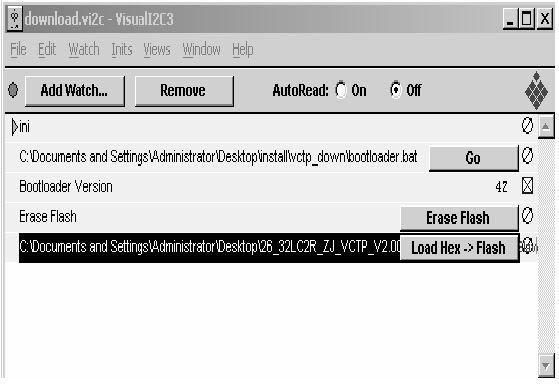
  • Double click the blue box and confirm "Bootloader Version" as 42.
  • Click the "Erase Flash" button.
  • Double click the download file low then, "edit" window will be opened.

  • Click the choice button I n the "edit window", then "file choice window’ will be opened.
  • Choose the Hex file in folder and execute downloading with click "open button"
  • Click OK button at the "edit window"
  • Downloading.
  • If download is failed, for example "No acknowledge from slave", execute download again from (1).

LG 32LC41 - 32LC42 - 32LC43 - 32LC44 - S/W PROGRAM DOWNLOAD METHOD - 2


DOWNLOAD METHOD -2 [Download method - 1 by previous post]
  • Download method 2 (AV Plate Ass’y)
  • Push S/W ‘ON" (connect SCL to GND using switch at Jig) and connect the download jig to D-sub jack.
  • Supply the power (Stand-by 5V) and wait for 3 seconds.
  • Push the S/W off (Disconnect SCL to GND using switch at jig).
  • Execute ‘Download.vi2c’ program in PC, then a main widow will be opened.
  • Double click the blue box and confirm "Bootloader Version" as 42.
  • Click the "Erase Flash" button.
  • Double click the download file low then, "edit" window will be opened.


  • Click the choice button I n the "edit window", then "file choice window’ will be opened.
  • Choose the Hex file in folder and execute downloading with click "open button".
  • Click OK button at the "edit window"
  • Under Downloading progress

  • If download is failed, for example "No acknowledge from slave", execute download again from (1).
Download Method -3 Follows by next post.

LG 32LC41 - 32LC42 - 32LC43 - 32LC44 - S/W PROGRAM DOWNLOAD METHOD -1


                   Download method 1 (PCB Ass’y)

  • Connect the download jig to D-sub jack
  • Execute ‘Download.vi2c’ program in PC, then a main window will be opened.
  • Double click the blue box and confirm "Bootloader Version" as 42.
  • Click the "Erase Flash" button
  • Double click the download file low, then "edit" window will be opened.


  • Click the choice button in the “edit window”, then “file choice window” will be opened.
  • Choose the Hex file in folder and execute downloading with click " open" button.

  • Click OK button at the "edit window".
  • Under Downloading process
  • If download is failed, for example "No acknowledge from slave". Execute download again from(1).

DOWNLOAD METHOD - 2 BY NEXT POST

LG 32LC41 - 32LC42 - 32LC43 - 32LC44 - PROGRAM DOWNLOAD INSTRUCTIONS - SOFTWARE [FIRMWARE] UPDATE


DOWNLOAD PROGRAM INSTALLATION
  • Extract a Zip file & Visual I2C & LPT Driver Installation.
  • Install the LPT Driver Install the Visual I2C.

LPT Port Driver (LptDrv) Setups : Program Files > Micronas > Visual I2C > Port_Driver
Use for Windows 95/98 : Setup_LptDrv_v0104_9x.exe
Use for Windows 2000/XP : Setup_LptDrv_v0202_XP_2000.exe
Use for Windows NT : Setup_LptDrv_v0104_NT.exe
  • Verification (Start > Programs > Micronas > Visual I2C or LptDrv
  • LPT delay setting(File > Preference > LPT preferences)
  • Exchange the bootloader.bat file.
  • Select the "Bootloader.bat" file(install > VCTP_download > Bootloader)
  • Push "OK"
  • Finish the program, after saving the file "download_cs.vi2c"  (if you click [x] , the massage appears automatically)

HOW TO PROGRAM CISCO AT-6400 REMOTE CONTROL


PROGRAMMING PROCEDURE

     Remote is initially programmed to only operate your set-top. You will need to set up the remote to operate your other devices using its TV, DVD, and AUX modes. The TV key may be programmed to operate a standard or high-definition television (HDTV). The DVD key may be programmed to operate a DVD player. The AUX key may be programmed to operate a VCR, a receiver, an amplifier, or a Home Theater in a Box (HTIB) system. If the remote provides only limited functionality for a device, you can look for a code that provides more functionality.
Note: You have the option to assign some remote keys to operate one device type only. For example, you may want to assign volume control to the TV only.  If this is the case, you can reprogram power, volume, and channel control using procedures found later in this guide.

DIRECT CODE ENTRY METHOD
  1. Refer to the code tables.
  2. Turn on the device that you want to assign to a mode key.
  3. Press and hold the appropriate mode key (TV, DVD, or AUX) on the remote, and then press and hold the OK key.
  4. Release both keys and the mode keys blink twice.
  5. Enter the first 4-digit setup code for the device using the numeric keys (0-9) on the remote. The mode key blinks three times to indicate that the code entry was accepted.
  6. Point the remote at the device, and press POWER to test the device.
  7. Did the device power off?  • If yes, write this code number in the table found in this guide. You may need it again if the device code is accidentally erased.   If no, repeat this procedure from step 3 using a different setup code.  Note: If none of the codes listed for your brand of  device operate the device correctly, go to What If None of the Codes Work for instructions.
  8. Repeat this procedure for each mode key you want to program.  {When an invalid code is entered, the selected mode key displays a long flash to indicate that you have not entered the code correctly.   Should the remote time out before you complete the code setup, you must start over. This is indicated by one long flash of the red LED.}
Auto-Searching the Code Library for TV or DVD Mode Codes  (Program Code 922).
  1. Turn on the device you that you want to assign to the TV or DVD key.
  2. Point the remote at the device.
  3. Press and while holding a selected mode key (TV or DVD), press the OK key. For example, to search for a TV code, press and hold TV and OK at the same time.
  4. Release both keys and all the mode keys blink twice.
  5. Enter the programming code 9 2 2 by pressing the numeric keys on the remote. The mode key you selected in step 3 blinks twice to indicate a successful entry.
  6. Point the remote toward the device, and press PLAY.
  7. Your device powers off when it finds the correct code. Then, choose one of the following options:
  • Save code and exit – Press the ENTER key on the remote to program the code in the remote and the mode key flashes three times indicating successful entry.
  • Step forward – Press the fast-forward (FF) key on the remote to step ahead through the codes one at a time. Then, return to step 6.
  • Step backward – Press the rewind (REW) key on the remote to step back through the codes one at a time. Then, return to step 6.
  • Exit without saving the code – Press the EXIT key on the remote. The selected mode key flashes three times and returns to normal operation.
  • Send the current code – Press the POWER key on the remote to send the current code. If the device turns back on, press the ENTER key. If the device does not turn on, return to step 6.
  • Continue with auto-search function – Press the PLAY key on the remote to continue with the auto search function. Then, return to step 6.
Auto-Searching the Code Library for AUX Mode Codes (Program Code 922)
  1. Turn on the device that you want to assign to the AUX key.
  2. Point the remote at the device.
  3. Press and while holding the AUX key, press the OK key.
  4. Release both the AUX key and the OK key and all the mode keys blink twice.
  5. Enter the programming code 9 2 2 by pressing the numeric keys on the remote. The AUX key blinks twice indicating a successful entry.
  6. Press the PLAY key, choose one of the following device categories and then, using the number keys on the remote, press its assigned number (1 – 4) based on the list:  1 = VCRs 2 = Receiver/Tuners 3 = Amplifiers 4 = HTIB [Note: The device categories are number-coded to provide a more direct programming method.]
  7. Point the remote toward the device, and press PLAY.
  8. Your device powers off when it finds the correct code. Then, choose one of the following options:
  • Save code and exit – Press the ENTER key on the remote to program the code in the remote and the mode key flashes three times indicating successful entry.
  • Step forward – Press the fast-forward (FF) key on the remote to step ahead through the codes one at a time. Then, return to step 7.
  • Step backward – Press the rewind (REW) key on the remote to step back through the codes one at a time. Then, return to step 7.
  • Exit without saving the code – Press the EXIT key on the remote. The selected mode key flashes three times and returns to normal operation.
  • Send the current code – Press the POWER key on the remote to send the current code. If the device turns back on, press the ENTER key. If the device does not turn on, return to step 7.
  • Continue with auto-search function – Press the PLAY key on the remote to continue with the auto search function. Then, return to step 7.
Controlling Volume for One Device (Program Code 955)
  1. Press and hold the STB mode key on the remote.
  2. Without releasing the STB key, press and hold the OK key.
  3. Release both keys and all mode keys blink twice.
  4. Enter the programming code 9 5 5 by pressing the number keys on the remote. The STB mode key blinks twice indicating a successful entry.
  5. Press and release the mode key for the device you want the volume keys to control. For example, if you want to control volume through your TV, press and release TV. The selected mode key blinks three times to indicate a successful entry.  The volume keys now control only one device whether you are in STB, TV, DVD, or AUX mode.
Controlling Volume for Different Devices (Program Code 955)
  1. Complete steps 1 through 4 of the Controlling Volume for One Device procedure.
  2. Press and release the Enter key. The STB mode key blinks three times to indicate a successful entry.  After you press the Enter key, the volume keys control the device assigned to that mode. For example, in TV mode, the volume keys control volume for the TV only.  Notes: • If any other key is pressed except the Mode keys and the ENTER key, the remote does not accept any changes or updates. The STB mode key displays a long red flash and the remote returns to normal operation.
  • If the remote times out before you complete programming volume control, the remote does not accept any changes. You must start over from step 1 of this procedure.
                                                                                                       >> FOR MORE >>

CISCO AT6400 - SETUP CODE LIST - ALL TOUCH REMOTE CONTROL


                                                  CODE LIST


TV CODES
 Abex 1098
Admiral 1001, 1099
Advent 1005, 1053, 1110, 1113
Adventura 1100
Aiko 1015
Aiwa 1034
Akai 1002, 1427
Alleron 1044
Amtron 1036
Anam National 1003, 1036
AOC 1004, 1005
Apex 1111, 1119, 1163, 1256
Audiovox 1036
Bang & Olufsen 1453
Belcor 1004
Bell & Howell 1001, 1045
Benq 1042
Bradford 1036
Broksonic 1114, 1121, 1382, 1383
Brokwood 1004
Candle 1004, 1007, 1100
Celebrity 1002
Citizen 1004, 1007, 1015, 1036, 1073, 1097, 1100
Colortyme 1004
Concerto 1004
Contec/Cony 1011, 1012, 1036
Craig 1036
Crosley 1000, 1053
Crown 1036, 1053
CTX 1257
Curtis Mathes 1000, 1004, 1014, 1045, 1073, 1097, 1385
CXC 1036
Cytron 1456
Daewoo 1004, 1005, 1013, 1015, 1016, 1097, 1106 1258 ,1362,
1368, 1369
Daytron 1004, 1097
DiamondVision 1461
Dimensia 1000
Dumont 1160
Durabrand 1259
Dynatech 1004
Electroband 1002
Electrohome 1002, 1003, 1004,1018, 1021
Emerson 1004, 1011, 1013, 1025, 1028, 1031, 1033, 1036, 1044,1045, 1080, 1097, 1101, 1102, 1107, 1382, 1383
Envision 1004
Fisher 1043, 1045, 1047, 1103
Fujitsu 1044, 1029
Funai 1036, 1044, 1384
Futuretec 1036
Gateway 1038
GE 1000, 1003, 1004, 1008, 1021, 1048, 1049, 1063, 1068,
1094, 1144, 1164, 1224, 1367, 1380, 1381, 1385, 1386
Gibralter 1160
Goldstar 1004, 1005, 1011, 1018, 1050, 1090, 1091, 1097, 1098,
1400, 1401
Grunpy 1036, 1044
Hallmark 1004
Harley Davidson 1384
Harvard 1036
Hisense 1112
Hitachi 1004, 1011, 1012, 1051, 1052, 1084, 1085, 1086, 1087,1102, 1225, 1384
HP 1408
Ilo 1457
IMA 1036
Infinity 1053
Janeil 1100
JBL 1053
JC Penney 1000, 1004, 1005, 1007, 1012, 1021, 1048, 1049, 1058,
1063, 1068, 1072, 1073, 1075, 1097, 1098
JCB 1002
Jensen 1004, 1232, 1285, 1314, 1376
JVC 1011, 1012, 1026, 1049, 1052, 1054, 1055, 1080, 1092,1117, 1131, 1235, 1288, 1299
Kawasho 1002, 1004
Kenwood 1004, 1018
Kloss Novabeam 1036, 1056, 1057, 1100
KTV 1036, 1097, 1101
LG 1005, 1396, 1397, 1398, 1399, 1402, 1403, 1404, 1405
Lloyd’s 1384
Loewe 1053
Logik 1001
Luxman 1004
LXI 1000, 1004, 1045, 1053, 1058, 1068, 1075
Magnavox 1004, 1007, 1018, 1053, 1056, 1057, 1059, 1060, 1083,1110, 1147, 1228, 1260, 1300, 1301, 1302, 1321, 1326,
1339, 1365, 1366, 1371, 1384, 1387
Magnin 1380
Majestic 1001
Marantz 1004, 1051, 1053
Media Center 1408
Megatron 1004, 1051
Memorex 1001, 1004, 1005, 1022, 1045
MGA 1004, 1005, 1018, 1021, 1047, 1061, 1062, 1380
Midland 1049, 1068, 1097, 1098, 1160
Minutz 1048
Mitsubishi 1004, 1005, 1018, 1021, 1047, 1061, 1062, 1081, 1381
Montgomery Ward 1001
Motorola 1003, 1099
MTC 1004, 1005, 1073
Multitech 1036
NAD 1004, 1058, 1075, 1085
NEC 1003, 1004, 1005
Net-TV 1040
Olevia 1420
Nikko 1004, 1015
Norcent 1217, 1320
NTC 1015
Onwa 1036
Optimus 1085
Optonica 1064, 1099
Orion 1023, 1033, 110, 1382, 1383
Panasonic 1003, 1010, 1049, 1053, 1096, 1123, 1152, 1231, 1289,
1292, 1295, 1303, 1304, 1305, 1306, 1385
Penney 1380, 1385
Philco 1003, 1004, 1005, 1007, 1011, 1018, 1053, 1056, 1057,1059
Philips 1003, 1004, 1007, 1011, 1017,1018, 1053, 1056, 1057,1059, 1060, 1063, 1110, 1126, 1129, 1148, 1155, 1238,
1263, 1264, 1265, 1290, 1291, 1307, 1308, 1309, 1337,1389
Philips Magnavox 1260, 1264, 1265, 1266
Pilot 1097
Pioneer 1004, 1085, 1102
Polaroid 1285, 1458
Portland 1004, 1005, 1015, 1097
Price Club 1073
Prima 1113
Prism 1049
Proscan 1000, 1008, 1068, 1108
Proton 1004,1011
Pulsar 1160
Pulser 1004
Quasar 1003, 1039, 1049, 1096, 1165, 1166, 1385
Radio Shack/ 1000, 1004, 1011, 1036, 1045, 1064, 1097, 1098, 1384
Realistic
RCA 1000, 1003, 1004, 1005, 1008, 1018, 1049, 1065, 1066,1067, 1068, 1069, 1070, 1071, 1082, 1102, 1104, 1106,1108, 1115, 1151, 1162, 1167, 1168, 1268, 1269, 1270,
1271, 1310, 1355, 1359, 1361, 1370, 1373, 1379, 1380,1381, 1385, 1386
Runco 1160
Sampo 1004, 1097, 1098, 1120
Samsung 1004, 1005, 1011, 1014, 1018, 1019, 1072, 1073, 1074,1097, 1098, 1156, 1161, 1297, 1323, 1360, 1363, 1364
Sansui 1023, 1107, 1122, 1273, 1382, 1383, 1384
Sanyo 1045, 1062, 1095, 1103, 1380
Scotch 1004
Scott 1004, 1011, 1033, 1036, 1044
Sears 1000, 1004, 1012, 1018, 1044, 1045, 1047, 1055, 1058,1068, 1075, 1076, 1103, 1105, 1384
Sharp 1004, 1009, 1011, 1025, 1064, 1077, 1078, 1097, 1099,
1153, 1157, 1274, 1298, 1311, 1312, 1362, 1375, 1378
Shogun 1004
Signature 1001
Simpson 1007
Sony 1002, 1109, 1137, 1201, 1202, 1249, 1272, 1275, 1276,1277, 1278, 1317, 1356, 1374, 1384, 1388
Soundesign 1004, 1007, 1036, 1044
Squareview 1105
SSS 1036
Starlite 1036
Supre-Macy 1100
Supreme 1002
Sylvania 1004, 1007, 1018, 1027, 1153, 1056, 1057, 1059, 1060,1124, 1150, 1145, 1279, 1296, 1387, 1464
Symphonic 1024, 1031, 1036, 1105, 1280, 1384
Tandy 1099
Tashiko 1058
Tatung 1003
Technics 1049
Techwood 1004, 1049
Teknika 1001, 1004, 1005, 1007, 1111, 1012, 1015, 1036, 1044,1060, 1073, 1096, 1097
Tera 1004, 1011
Thomas 1384
TMK 1004
Toshiba 1006, 1045, 1058, 1073, 1175, 1079, 1093, 1116, 1154,
1158, 1159, 1252, 1267, 1281, 1282, 1283, 1284, 1286,1293, 1294, 1313, 1315, 1319, 1338, 1364, 1377
Totevision 1097
Universal 1048, 1063
Victor 1055
Vidtech 1004, 1005
Viking 1100
Wards 1000, 1001, 1004, 1005, 1118, 1031, 1044, 1048, 1053,
1056, 1057, 1059, 1060, 1063, 1064
Westinghouse 1013
Yamaha 1004, 1005, 1018
Zenith 1001, 1089, 1118, 1125, 1161, 1287, 1357, 1382, 1383,
1384

HDTV
Akai 1427, 1432
Apex 1088
Astar 1434
Audiovox 1455
Axion 1459
Benq 1136
Coby 1460
Daewoo 1135
Dell 1141, 1142, 1146, 1394, 1395, 1409
Element 1431
Emerson 1468
Emprex 1438
Epson 1422, 1451
Fujitsu 1029
Gateway 1038, 1449
Hewlett Packard 1419, 1444, 1445, 1452
Hitachi 1030, 1132, 1133, 1134, 1191, 1208, 1209, 1210, 1211,1212, 1226, 1322, 1324, 1328, 1344, 1447
HP 1419, 1445, 1452
Ilo 1412, 1435, 1436
InFocus 1450
Initial 1457
Insignia 1437
JVC 1130, 1131, 1227
LG 1343, 1346, 1396
Magnavox 1329, 1358, 1372, 1414
Maxent 1424
Mintek 1457
Mitsubishi 1032, 1213, 1229, 1230, 1448
NEC 1193, 1423
NET-TV 1040
Olevia 1406, 1418, 1421, 1462
Panasonic 1140, 1169, 1170, 1194, 1233, 1234, 1331, 1336, 1410,1417, 1442, 1466
Philips 1126, 1129, 1236, 1237, 1239, 1261, 1334, 1351, 1390,1411
Pioneer 1035, 1195, 1240, 1335, 1469, 1470
Polaroid 1262, 1391, 1392, 1393, 1396, 1431, 1440
Proscan 1000
Protron 1430
Proview 1407
RCA 1143, 1196, 1241, 1242
Sampo 1038, 1243
Samsung 1019, 1171, 1172, 1173, 1174, 1175, 1197, 1198, 1199,1200, 1245, 1246, 1325, 1327, 1352, 1354, 1443
Sceptre 1467
Scott 1428
Sharp 1138, 1176, 1177, 1214, 1244, 1247, 1248, 1348, 1350,1415, 1416
Sony 1037, 1128, 1137, 1178, 1215, 1216, 1218, 1219, 1220,1221, 1250, 1251, 1316, 1318, 1330, 1347, 1413
SVA 1446
Sylvania 1046, 1465
Syntax 1418
Syntax-Brillian 1418
Tatung 1426
Toshiba 1127, 1179, 1203, 1204, 1222, 1223, 1332, 1340, 1341,1345, 1353
Trutech 1425
Viewsonic 1038, 1149, 1180, 1181, 1182, 1183, 1184, 1185, 1186,1187, 1188, 1189, 1190, 1205, 1206, 1441
Viore 1435
Vizio 1429, 1433, 1439
Westinghouse 1454
Zenith 1020, 1139, 1207, 1253, 1255, 1333, 1342, 1349

DVD
Aiwa 2026, 2131
Akai 2378
Amphion 2342
MediaWorks
AMW 2342
Apex 2001, 2056, 2057, 2061, 2095, 2098, 2229, 2250, 2316,2322, 2330
Apex Digital 2261, 2262, 2263, 2266, 2269, 2291
Arrgo 2325
Astar 2354
Audiovox 2132, 2373, 2388
Axion 2379
Bang & Olufsen 2324, 2370
Blaupunkt 2136, 2322
Bose 2122, 2130, 2215
Boss 2336
Broksonic 2053, 2072, 2284
Cambridge 2395
SoundWorks
Cinevision 2152, 2195
Clarion 2100
Classic 2101, 2391
Coby 2380, 2387
Curtis 2387
CyberHome 2083, 2325
Cytron 2374
Daewoo 2058, 2062, 2137, 2138, 2190
Denon 2110, 2133, 2040, 2216, 2247, 2253, 2317
Desay 2344
DiamondVision 2382
Disney 2321
Durabrand 2326
Eclipse 2335
Emerson 2002, 2059, 2073, 2321, 2327, 2392
ESA 2327, 2394
Fisher 2112, 2134, 2255
Funai 2002, 2321, 2327
Gateway 2346
GE 2079, 2118, 2041, 2261, 2272, 2319, 2322
Go Video 2046, 2127, 2129, 2124, 2230, 2239, 2249, 2346
GPX 2114, 2390
Greenhill 2322
Grundig 2320
Harman Kardon 2125
Hitachi 2000, 2027, 2126, 2173, 2240
Ilo 2375
Initial 2322, 2381
Insignia 2327, 2369, 2394
Irradio 2149, 2150
JVC 2017, 2028, 2047, 2090, 2096, 2097, 2115, 2166, 2204,2206, 2217, 2218, 2232, 2242, 2265, 2277, 2283, 2359,2360, 2361, 2362, 2364, 2365, 2366, 2367
Kenwood 2142, 2148
KLH 2322
Konka 2029, 2030, 2376
Koss 2060, 2200
Lasonic 2081
Lenoxx 2326
LG 2297, 2303, 2339, 2352, 2363, 2368, 2371
Liteon 2346, 2353
Magnavox 2002, 2018, 2033, 2089, 2237, 2241, 2245, 2259, 2270,2293, 2318, 2320, 2321, 2327
Marantz 2143, 2320
Memorex 2003
Mintek 2004, 2322, 2381
Mitsubishi 2019, 2123, 2145, 2147
NAD 2059, 2139
Nakamichi 2116
Nesa 2322
Nexxtech 2140, 2256, 2328
Norcent 2005, 2117
Onkyo 2006, 2219, 2220, 2318
Oppo 2323
Oritron 2009
Panasonic 2031, 2066, 2075, 2076, 2104, 2105, 2106, 2111, 2167,2179, 2188, 2198, 2207, 2211, 2212, 2221, 2228, 2248,
2151, 2153, 2154, 2155, 2258, 2268, 2300, 2318, 2384,2385, 2386, 2398, 2399
Philips 2018, 2032, 2033, 2045, 2051, 2091, 2109, 2156, 2157,2158, 2159, 2169, 2208, 2209, 2222, 2243, 2259, 2260,
2264, 2282, 2285, 2302, 2304, 2318, 2320, 2321, 2404
Pioneer 2008, 2021, 2160, 2164, 2191, 2223, 2224, 2267, 2310,2337, 2400
Polaroid 2007, 2377, 2409
Polk Audio 2320
Presidian 2321
Proscan 2010, 2118, 2144, 2205, 2319
Qwestar 2009
RCA 2010, 2048, 2055, 2063, 2077, 2099, 2107, 2118, 2161,2165, 2172, 2177, 2181, 2261, 2275, 2281, 2287, 2289,2319, 2322, 2331
Sampo 2119
Samsung 2012, 2049, 2074, 2085, 2102, 2175, 2186, 2196, 2214,
2233, 2246, 2274, 2279, 2286, 2290, 2294, 2295, 2299,2311, 2314, 2333, 2340, 2347, 2351
Sansui 2071
Sanyo 2034, 2050, 2120, 2393
Sensory Science 2345
Sharp 2013, 2015, 2044, 2082, 2086, 2170, 2174, 2292, 2321,2396
Sherwood 2121, 2397
Sony 2014, 2020, 2022, 2065, 2067, 2068, 2069, 2070, 2087,2103, 2108, 2113, 2162, 2171, 2176, 2178, 2182, 2187,2189, 2192, 2193, 2201, 2202, 2203, 2226, 2238, 2244,2251, 2257, 2273, 2278, 2280, 2288, 2296, 2298, 2305,2306, 2307, 2309, 2313, 2315, 2329, 2332, 2338, 2355,2356, 2357, 2405, 2406, 2407
Sungale 2343
Sylvania 2002, 2064, 2078, 2092, 2194, 2213, 2321, 2327, 2408
Symphonic 2321
Techwood 2141
TiVo 3074, 3244, 3245, 3246, 3249, 3250
Toshiba 2023, 2025, 2037, 2038, 2040, 2041, 2054, 2080, 2084,
2088, 2093, 2094, 2168, 2180, 2183, 2184, 2185, 2197,
2210, 2227, 2231, 2235, 2259, 2271, 2276, 2284, 2301,2318, 2334, 2341
Toshiba 2135, 2312, 2348, 2349, 2350, 2358, 2401, 2402, 2403
Trutech 2345
Urban Concepts 2318
Venturer 2011
Westinghouse 2372
Xbox 2319
Yamaha 2106, 2146, 2163, 2320, 2389
Zenith 2039, 2052, 2128, 2199, 2234, 2236, 2252, 2308, 2318

AMPLIFIERS
Aiwa 6003, 6020
Carver 6002
Citizen 6026
Curtis Mathes 6046
Denon 6014, 6039, 6057
Fisher 6002
GE 6028, 6045
Goldstar 6016, 6021
Harman Kardon 6013, 6047
Hitachi 6034
JBL 6050
JVC 6018, 6024, 6041
Kenwood 6015, 6022
Left Coast 6047
Magnavox 6035
Marantz 6000, 6047, 6058
Nakamichi 6012
NEC 6033, 6048
Onkyo 6005, 6006, 6017, 6054, 6056
Optimus 6008, 6046
Panasonic 6001, 6040
Parasound 6059
Philips 6047
Pioneer 6004, 6009, 6010, 6023, 6036, 6046, 6051
Polk Audio 6047
Proton 6035
Quasar 6001
RCA 6025, 6046
Sharp 6029, 6030, 6031, 6032
Sherwood 6011
Shure 6048
Sony 6020, 6042, 6044, 6049
Soundesign 6045
Teac 6019
Technic 6001
Technics 6001, 6040
Toshiba 6027
Victor 6024
Wards 6045
Yamaha 6007, 6037, 6038, 6043, 6052, 6053

HITB [HOME THEATER IN A BOX]
Apex 4049 2316
Audiovox 4053 2388
Bose 4000 2130, 2215
Cambridge 4060 2395
Sound Works
Classic 4055 2391
Coby 4052 2387
Curtis 4056 2387
Denon 4012 2216
Emerson 4057 2392
GPX 4055 2390
Insignia 4059 2394
JBL 4001 2043
JVC 4002, 4013, 4014, 4028 2035, 2217, 2218, 2283
Koss 4003, 4015 2060, 2200
LG 4041 2303
Magnavox 4035 2293
Onkyo 4004, 4016, 4017 2024, 2219, 2220
Panasonic 4005, 4018, 4030, 4038, 2104, 2221, 2300, 2384,4050, 4051 2385, 2386
Philips 4006, 4019, 4027, 4039, 2036, 2222, 2282, 2304, 4042
Pioneer 4007, 4020, 4021, 4029 2016, 2223, 2224
RCA 4008, 4026 2042, 2281, 2161
Samsung 4033, 4036, 4047 2294, 2299, 2295, 2314
Sanyo 4058 2393
Sharp 4061 2396
Sherwood 4062 2397
Sony 4009, 4010, 4022, 4023, 2113, 2108, 2225, 2226,
4024, 4031, 4032, 4034, 2278, 2288, 2296, 2305,4043, 4044, 4045, 4046, 2306, 2307, 2315,4048
Toshiba 4025, 4040 2227
Venturer 4011 2011
Yamaha 4054 2389
Zenith 4037

TUNER/RECEIVER
ADC 5144
Aiwa 5000, 5001, 5002, 5004, 5005, 5006, 5034, 5143
Akai 5083
Audiotronic 5145
Audiovox 5152
Bang & Olufsen 5151
Bose 5007
Capetronic 5144
Carver 5000, 5143 ,5145
Denon 5008, 5035, 5036, 5037, 5038, 5039, 5040, 5041, 5042,
5043, 5044, 5045, 5046, 5047, 5048, 5049, 5050, 5051,5052, 5053, 5054, 5114, 5124
Eclipse 5149
Gradiente 5153
Harman Kardon 5000, 5009, 5055, 5056, 5142, 5143
JBL 5009
JVC 5010, 5057, 5058, 5059, 5116
Kenwood 5011, 5012, 5013, 5060, 5061, 5062, 5063, 5064, 5065,5066, 5067, 5068, 5123, 5127, 5128, 5132, 5148
Linn 5000, 5143
Magnavox 5000, 5143, 5144, 5145
Marantz 5000, 5069, 5143, 5145
Mitsubishi 5070, 5071, 5072
Onkyo 5018, 5073, 5074, 5075, 5076, 5077, 5078, 5079, 5080,5081, 5082, 5084, 5085, 5086, 5087, 5130, 5131, 5140
Optimus 5144
Panasonic 5019, 5020, 5107, 5108, 5109, 5110, 5111, 5115, 5126
Philips 5000, 5112, 5138, 5143, 5145, 5154
Pioneer 5021, 5022, 5088, 5089, 5090, 5091, 5092, 5093, 5094,5119, 5120, 5144, 5147
Polaroid 5141
Polk Audio 5143
RCA 5024, 5025, 5026, 5137, 5144
Rotel 5150
Samsung 5139
Sansui 5000, 5143
Sherwood 5027
Sony 5017, 5023, 5028, 5029, 5030, 5031, 5032, 5033, 5095,
5096, 5097, 5113, 5117, 5121, 5125, 5129, 5133, 5134,5136, 5146
Technics 5016, 5019, 5020, 5098, 5099, 5100, 5101, 5115, 5122,5126
Thorens 5145
Wards 5000, 5021, 5143
Yamaha 5003, 5014, 5015, 5021, 5102, 5103, 5104, 5105, 5106,
5118, 5135

VCR
ABS 3223
Admira 3001
Adventura 3021
Aiwa 3021
Akai 3003, 3055, 3058
American High 3016
Apex 3189
Audio Dynamics 3005, 3006
Bang & Olufsen 3222
Bell & Howell 3007
Broksonic 3081, 3082, 3202, 3213
Candle 3011, 3013, 3014
Canon 3016
Carver 3036
CineVision 3242
Citizen 3011, 3013, 3014
Colortyme 3005
Curtis Mathes 3000, 3005, 3014, 3016, 3212
CyberPower 3223
Daewoo 3011, 3013, 3021, 3076, 3120, 3150
DBX 3005, 3006
Dell 3223
Dimensia 3000
Dynatech 3021
Electrohome 3023
Emerson 3003, 3011, 3016, 3021, 3023, 3038, 3083, 3202
Expressvu 3247
Fisher 3007, 3029, 3030
Fuji 3016, 3058
Funai 3002, 3021
Garrard 3021
Gateway 3223
GE 3000, 3016, 3059, 3090, 3201, 3203, 3212
Go Video 3066, 3073, 3109, 3110, 3188, 3193, 3221
GOI 3247
Goldstar 3005, 3014
Gradiente 3021
Harley Davidson 3021
Harman Kardon 3005
Headquarter 3007
Hewlett Packard 3223
Hitachi 3052, 3055, 3059, 3117, 3169
HNS 3243
HP 3223
HTS 3247
Hughes 3246, 3250
Humax 3246
Hush 3223
Insignia 3239
Instant Replay 3016
JC Penney 3005, 3006, 3007, 3016, 3030, 3036, 3052
JCL 3016
Jensen 3055
JVC 3005, 3006, 3007, 3014, 3055, 3060, 3067, 3118, 3121,
3122, 3123, 3124, 3125, 3126, 3127, 3151, 3170, 3171,3194, 3205, 3228, 3229, 3230, 3231, 3234, 3235, 3236,3237, 3247, 3248, 3250
Kenwood 3005, 3006, 3007, 3014, 3055, 3060
Kodak 3016
LG 3233, 3238
Linksys 3223
Lloyd’s 3021
Magnavox 3016, 3036, 3037, 3051, 3061, 3128, 3152, 3153, 3154,3181, 3183, 3190, 3206, 3211
Magnin 3201
Marantz 3005, 3006, 3007, 3014, 3016, 3036
Matsushita 3016
Media Center PC 3223
MEI 3016
Memorex 3001, 3004, 3007, 3016, 3021, 3051
MGA 3023, 3038, 3201
Mind 3223
Minolta 3052
Mitsubishi 3023, 3038, 3039, 3060, 3108, 3203
Montgomery Ward 3001
Motorola 3001, 3016
Multitech 3021
NEC 3005, 3006, 3007, 3014, 3055, 3060
Niveus Media 3223
Northgate 3223
Olympus 3016
Optimus 3001
Optonica 3047
Orion 3004, 3202, 3213
Panasonic 3016, 3053, 3062, 3063, 3077, 3078, 3079, 3086, 3087,
3107, 3129, 3130, 3131, 3132, 3133, 3134, 3145, 3146,3155, 3156, 3157, 3158, 3159, 3172, 3191, 3197, 3207,3212, 3253
Penney 3201, 3212
Pentax 3052, 3059
Pentex Research 3014
Philco 3016, 3036, 3037
Philips 3016, 3036, 3047, 3061, 3071, 3135, 3160, 3161, 3173,3208, 3216, 3243, 3244, 3246, 3250, 3251
Philips Magnavox 3135
Pioneer 3006, 3060
Polaroid 3111
Portland 3013
Proscan 3000
Pulsar 3051
Quarter 3007
Quartz 3007
Quasar 3016, 3062, 3091, 3092, 3212
Radio Shack/ 3001, 3007, 3011, 3016, 3021, 3023, 3029, 3047
Realistic
RCA 3000, 3003, 3016, 3040, 3041, 3042, 3052, 3059, 3062,3068, 3075, 3093, 3094, 3106, 3136, 3162, 3174, 3175,3199, 3201, 3203, 3206, 3212, 3243, 3249, 3250
ReplayTV 3252
Ricavision 3223
Ricoh 3064
Runco 3051
Samsung 3011, 3069, 3084, 3089, 3101, 3148, 3184, 3214, 3215,3218, 3232, 3243
Sanky 3001, 3051
Sansui 3004, 3006, 3055, 3060, 3202, 3211, 3213
Sanyo 3007, 3070, 3201
Scott 3011, 3038
Sears 3007, 3016, 3029, 3030, 3052, 3211
Sharp 3001, 3013, 3023, 3047, 3080, 3100, 3137, 3163, 3164,3176, 3177, 3200
Shintom 3048, 3058
Signature 3001
Singer 3016, 3064
Sony 3048, 3049, 3058, 3085, 3104, 3138, 3139, 3140, 3178,
3179, 3187, 3192, 3195, 3209, 3211, 3217, 3223, 3224,3225, 3226, 3240, 3245
Stack 9 3223
STS 3016, 3052
Sylvania 3016, 3021, 3036, 3037, 3038, 3061, 3088, 3095, 3105,3147
Symphonic 3002, 3021
Systemax 3223
Tandy 3007
Tatung 3055
Teac 3021, 3042, 3055
Technics 3016, 3053
Teknika 3016, 3021, 3050
Thomas 3211
Toshiba 3011, 3029, 3030, 3038, 3096, 3098, 3099, 3102, 3103,3141, 3142, 3149, 3165, 3166, 3167, 3168, 3180, 3182,3185, 3210, 3219, 3220, 3223, 3227, 3241
Touch 3223
Vector Research 3005, 3006, 3011
Victor 3006
Video Concepts 3005, 3006, 3011
Viewsonic 3223
Voodoo 3223
Wards 3001, 3011, 3016, 3021, 3023, 3047, 3052
Westinghouse 3002
XR-1000 3016, 3021
Yamaha 3005, 3006, 3007, 3014, 3055
Zenith 3048, 3051, 3058, 3064, 3072, 3097, 3119, 3143, 3144,3186, 3196, 3198, 3202, 3204, 3211, 3213
ZT Group 3223